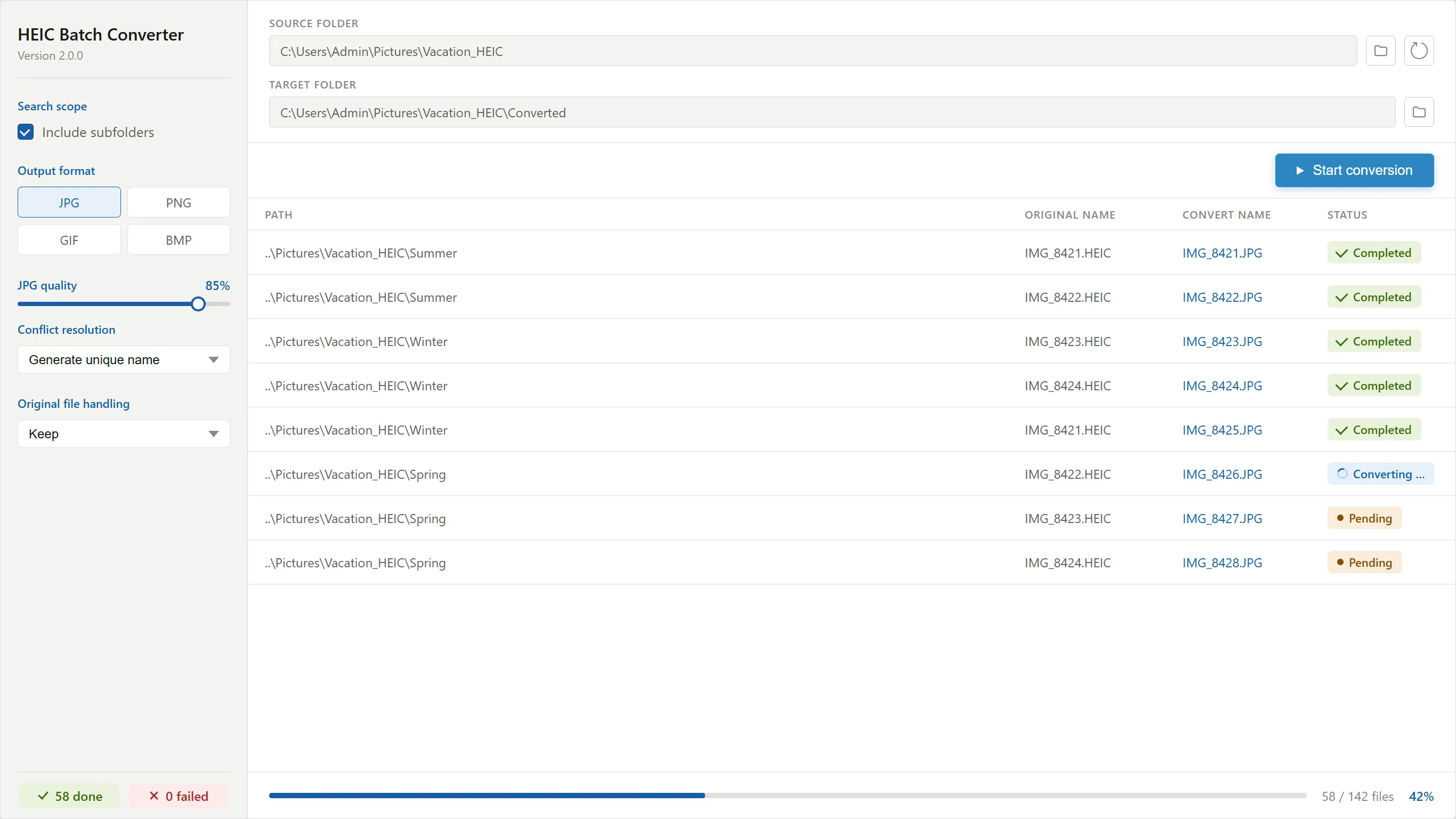
True batch conversion
Drop in hundreds or even thousands of HEIC files and convert them all in one run. Entire folders and subfolders included.
Windows Desktop Application
HEIC Batch Converter is a free Windows app that converts your iPhone's HEIC photos to JPG, PNG, GIF, or BMP, hundreds at a time, 100% offline. No uploads. No limits. No watermarks.
4.8/5Features
Everything about the app is designed around one job: getting a large pile of HEIC files into a format the rest of the world can open.
Drop in hundreds or even thousands of HEIC files and convert them all in one run. Entire folders and subfolders included.
Export to JPG, PNG, GIF, or BMP. Results for each format are tracked separately, so you can re-export the same batch to another format instantly.
A real-time JPG quality slider lets you balance file size against image clarity before you convert. No guesswork.
Duplicate file names are handled automatically: generate a unique name, replace the existing file, or skip it. Your choice, applied consistently.
Decide what happens to your HEIC originals after conversion: keep them, delete them, or move them to a folder of your choosing.
A per-file status table with clear badges shows exactly what succeeded, what failed and why, plus overall progress and statistics.
How it works
Choose a source folder (subfolders optional) and a target folder. The app finds every HEIC file automatically.
Select JPG, PNG, GIF, or BMP, set JPG quality, and decide how to handle duplicates and originals.
One click converts the whole batch. Watch per-file status update live while your folder structure is preserved.
Reviews
It works great and can load batches for free!!!
Converted over 200 files across a network drive in multiple folders. Flawless!!
This is a fast and efficient tool to batch convert HEIC to JPG, PNG, GIF, or BMP. It solves a problem I have struggled with and there is no extra fees or charges. Love it!
I have been trying to convert files for months with limits on how many and single conversions. This program asked for the file, found the pictures and converted them in seconds! Thank you!!!!!
This works perfectly - fast and easy. I'm so glad I don't have to convert my files one-by-one, now. Thank you!
Super fast bulk iPhone to JPG converter (converts bulk folders) a must have for faster editing of pics!
Real reviews, quoted verbatim from the app's Microsoft Store page.
Privacy by design
Online HEIC converters require uploading your personal photos to someone else's server. HEIC Batch Converter does all of its work locally on your machine. It even runs without an internet connection.
FAQ
Anything else? Email heicbatchconverter@gmail.com and a human will answer.
Yes. HEIC Batch Converter is a free app for Windows 10 and Windows 11, available on the Microsoft Store. There are no watermarks, no conversion limits, and no subscription.
No. All conversion happens locally on your PC. The app works completely offline, so your photos never leave your computer, unlike web-based HEIC converters that require uploading your images to a server.
HEIC Batch Converter converts HEIC/HEIF images to JPG, PNG, GIF, and BMP. For JPG output, an adjustable quality slider (up to 100%) controls the balance between file size and image clarity.
Yes. Point the app at a source folder and it converts every HEIC file inside, including subfolders if you enable that option. The original subfolder structure is recreated in the target folder.
JPG is a lossy format, so there is always some recompression. At the default 85% quality setting the difference is imperceptible for typical photos; you can raise the slider to 100% for maximum fidelity.
You decide. After a successful conversion the app can keep the originals in place, delete them, or move them to a folder you choose.
HEIC Batch Converter runs on Windows 10 and Windows 11, on both 64-bit and 32-bit (x86) systems. It is distributed and updated through the Microsoft Store.

Download HEIC Batch Converter free from the Microsoft Store and convert your whole photo library in one run.
Free download from Microsoft Store